
 By
·
4 minute read
By
·
4 minute read
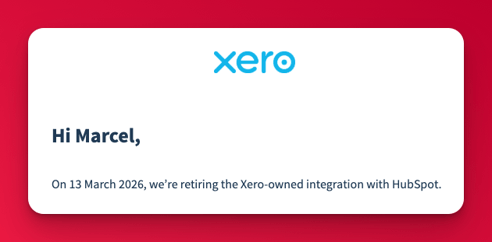
If you use HubSpot and Xero together, you may have received an email saying:
“The HubSpot CRM integration by Xero will be retired on 13 March 2026.”
For many teams, that message created uncertainty. Which integration is being retired? What breaks? Do you need to act now?
This guide explains, in clear and simple terms:
- Which Xero HubSpot integration is being retired
- Who is affected and who is not
- The real impact on your CRM and invoicing workflows
- What sensible next steps look like, without promoting any specific tool
This article is written to stay useful well beyond the retirement date.
Which Xero HubSpot integration is being retired?
Only one specific integration is being switched off.
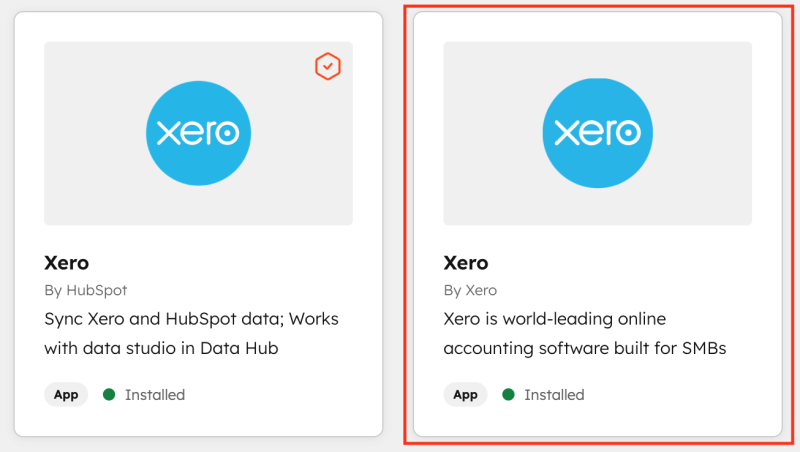
Xero is retiring the Xero-owned HubSpot CRM integration, commonly referred to as:
- “HubSpot CRM integration by Xero”
- “Xero by Xero”
This is the legacy integration that:
- Was built and maintained by Xero
- Can be installed from the Xero App Store
- Also appears in the HubSpot App Marketplace as a Xero-built app
On 13 March 2026, this integration will be automatically disconnected.
What happens when the Xero integration is retired?
Once the Xero-owned HubSpot integration is turned off:
- Xero contacts will stop syncing into HubSpot
- Xero invoices will no longer sync or update in HubSpot
- Invoice creation from HubSpot deals will stop (if you relied on this integration)
- Invoice status and payment data will no longer appear in HubSpot
- Any monthly charges related to this integration will be cancelled
No historical data is deleted from either system. The connection itself is simply removed.
What is not affected by the Xero retirement?
This retirement does not apply to:
- HubSpot-built Xero integrations
- HubSpot Data Sync with Xero
- Third-party HubSpot to Xero integrations
- Xero as an accounting platform
- HubSpot as a CRM
Xero is not ending support for HubSpot broadly. They are retiring their own legacy connector only.
How to check if your HubSpot portal is affected
Check connected apps in HubSpot
- Go to Settings → Integrations → Connected apps
- Look for any app named “Xero”
- Check the “Built by” label
If it says Built by Xero, you are using the integration being retired.
If it says Built by HubSpot, that integration is not included in the retirement.
Check your HubSpot deal records
If your deal sidebar includes a section labelled:
- “Integration Invoices”
- “Legacy Integration Invoices”
That is a strong signal you are using the Xero-owned integration.
Why is Xero retiring the HubSpot CRM integration?
The short answer is longevity.
The integration relies on older HubSpot accounting APIs that are no longer the strategic direction for HubSpot’s platform. Maintaining the integration long term would limit both Xero and HubSpot.
Rather than rebuild it, Xero has chosen to retire the app and encourage customers to move to newer integration approaches.
This is a common pattern with first-generation marketplace apps.
What impact will this have on your business?
For many HubSpot and Xero users, the answer is little to none.
The retirement only affects workflows that rely specifically on the Xero-owned legacy integration. If you are using a newer HubSpot-built or third-party integration, this change may have no practical impact at all.
You may be impacted only if the retired integration is actively part of your day-to-day process, for example:
- Creating Xero invoices directly from HubSpot using the Xero-built app
- Viewing or updating Xero invoice status inside HubSpot via that same integration
- Using legacy invoice properties from the Xero-owned app in reports or workflows
If you are using a different integration, or you manage invoicing entirely inside Xero, this retirement may simply pass by unnoticed.
The key point is this is not about features disappearing across HubSpot or Xero. It is about one specific, older connection being turned off.
This is less about software risk and more about understanding which integration you are actually using.
What should you do next?
1. Audit your current HubSpot and Xero setup
Document:
- What data syncs today
- Where invoices are created
- Which teams rely on that data
This prevents replacing one integration with another that does not match your needs.
2. Decide what actually needs to stay connected
Many businesses discover they do not need full invoice sync. Others realise they want tighter alignment between sales, finance, and reporting.
This is a good moment to reassess:
- Whether invoicing belongs inside the CRM
- Whether HubSpot or Xero should be the system of record
- How revenue data flows across teams
3. Evaluate integration approaches, not just tools
There are multiple ways to connect HubSpot and Xero, each with trade-offs around:
- Automation
- Reporting accuracy
- Complexity
- Cost
There is no universal replacement for the retired integration.
4. Plan the change deliberately
Treat this as a small systems project:
- Review workflows and reports that reference invoice data
- Identify properties that may disappear
- Test changes before March 2026
Handled well, this can improve your revenue operations rather than disrupt them.
Frequently asked questions (FAQ)
Is the HubSpot Xero integration being discontinued?
Only the Xero-owned HubSpot CRM integration is being discontinued. Other HubSpot and third-party Xero integrations remain available.
When will the Xero HubSpot integration be retired?
The retirement date is 13 March 2026.
Will my existing invoices be deleted?
No. Existing invoices remain in Xero. They simply stop syncing into HubSpot once the integration is disconnected.
Does this affect HubSpot Data Sync with Xero?
No. HubSpot’s own Xero data sync is separate and is not part of this retirement.
How do I know which Xero integration I am using?
Check Settings → Integrations → Connected apps in HubSpot and look at the “Built by” label on the Xero app.
Do I need to migrate before March 2026?
You do not need to migrate immediately, but you should plan ahead to avoid workflow disruption.
Is there a single best replacement for the Xero integration?
No. The right approach depends on how your sales, finance, and reporting processes are designed.
Key takeaway
This change is not a platform failure or a forced upgrade.
It is a reminder that integrations evolve, and older connections are sometimes retired as platforms mature. For many teams, nothing needs to change at all. For others, it is simply a prompt to double-check how HubSpot and Xero are connected today.
The most important step is understanding which integration you are using, before assuming there is a problem to solve.
Need help reviewing your HubSpot and Xero setup?
If you are unsure which integration your portal is using, or you want a second opinion on whether this retirement affects you at all, we can help.
At King Henry, we work with HubSpot and Xero setups every day. That includes:
- Reviewing your current integrations and data flows
- Confirming whether you are impacted by the Xero integration retirement
- Helping you plan next steps only if changes are genuinely required
There is no obligation to replace anything. Sometimes the outcome is simply peace of mind.
If you would like us to review your setup or answer questions specific to your portal, get in touch with King Henry and we will point you in the right direction.